Friendsgiving planner with a potluck sign-up
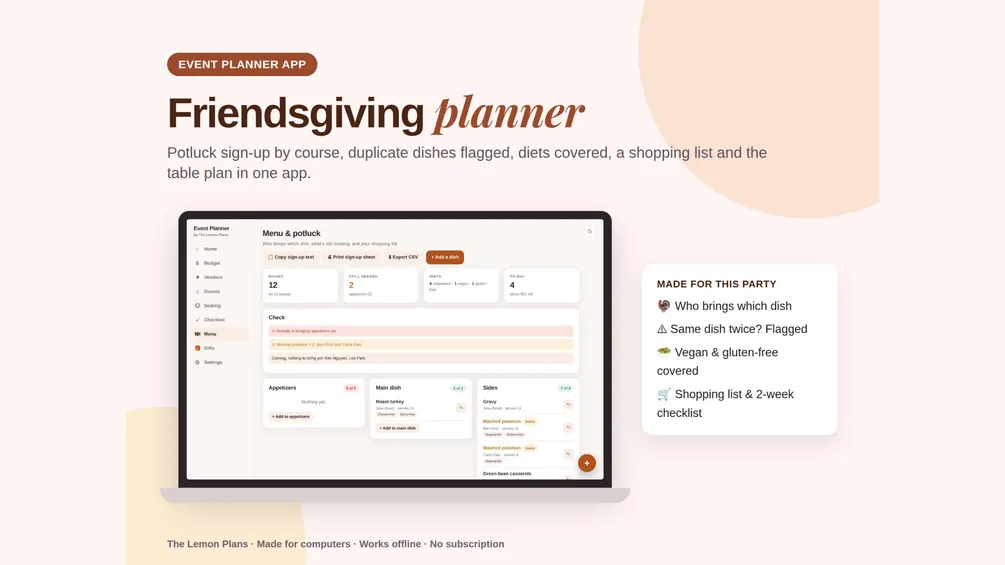
A Friendsgiving (or Thanksgiving) planner with a potluck sign-up: who brings which dish by course, a warning when the same dish comes twice or a course is empty, a dish for every diet, the shopping list for your turkey and a 2-week checklist.
- Potluck sign-up by course
- Same dish twice? Flagged
- Vegan and gluten-free guests covered
A friendsgiving / thanksgiving budget split to start from
For a $300 budget and about 12 guests. It's the default split in the app; change any % to fit your family.
A potluck keeps it cheap: the host makes the turkey (or the main) and drinks, guests sign up for the rest. Plan about 1.5 lb of whole turkey per person.
- Turkey & main dish30%$90
- Groceries for sides15%$45
- Drinks15%$45
- Desserts5%$15
- Table & decorations10%$30
- Disposables & supplies8%$24
- Rentals (chairs, tables)7%$21
- Other & Buffer10%$30
Friendsgiving / Thanksgiving checklist by deadline
In the app, each task gets a date counted back from your party.
2 weeks
- Set the date and the guest list
- Send invites with the potluck sign-up
- Order the turkey (or pick the main)
- Ask about allergies and diets
1 week
- Check the sign-up: fill empty courses
- Fix duplicate dishes
- Make the shopping list
- Borrow chairs, tables and serving dishes
4–5 days
- Thaw a frozen turkey in the fridge (1 day per 4–5 lb)
- Buy the groceries that keep
1–2 days
- Buy fresh groceries, drinks and ice
- Make the pies and make-ahead sides
- Set the table and the seating
The day
- Turkey in the oven (about 15 min per lb)
- Label dishes with diets (GF, V)
- Take a group photo
After
- Send leftovers home
- Return borrowed dishes
- Thank everyone
Potluck sign-up: who brings what
Add each dish to a course as people sign up. The app counts what each course needs for your head count and checks the menu for you.
- Courses: Appetizers, Main dish, Sides, Desserts, Drinks.Each shows how many dishes you have against a suggestion for your guest count.
- Same dish twice? Flagged.“Mashed potatoes × 2: Ben and Carla”, before anyone starts cooking.
- Empty courses and diets.Nobody bringing drinks, or a vegan guest with nothing to eat: it shows in the checks.
- Copy, print, shop.Copy the sign-up into the group chat, print a sign-up sheet, and tick off the shopping list for your own dishes.
Friendsgiving / Thanksgiving planning tips
What makes the biggest difference, from parents and hosts who've done it.
- Host makes the main, guests sign up.The host covers the turkey and drinks; everyone else picks a course. Post what's still needed in the group chat.
- Thaw the turkey in time.In the fridge, about 1 day per 4–5 lb: a 16 lb turkey needs 3–4 days. It's on the checklist.
- Plan about 1.5 lb of turkey per person.A little more if you want leftovers to send home.
- Label every dish.GF, V or VG cards on the table so guests with diets know what they can eat.
Everything in one app
Budget by category, vendors with deposits and due dates, guests and families, a floor plan with drag-and-drop seating and Auto-seat, a gift list and a countdown checklist. Light or dark, offline, no subscription.
Friendsgiving / Thanksgiving planner questions
When should I send Friendsgiving invites?
About two weeks before, with the potluck sign-up so people pick a dish early.
How do I stop everyone bringing the same thing?
Use the sign-up: the app flags the same dish twice and any course nobody is bringing, and the copy button puts what's still needed in your group chat.
Does it work for Thanksgiving, Christmas dinner or New Year's Eve?
Yes. Rename the event to Thanksgiving, or pick the Christmas Dinner or New Year's Eve template: they have the same dish sign-up.
Is there a subscription?
No. You pay once and keep the app. It's one file that opens in your browser on a computer, with no account.
Does it work on my phone?
It's made for computers right now.
Planning another party?
The same app has a template for each of these.
- Christmas Party plannerFriends & family party, potluck, gift swap
- Quinceañera plannerCourt, misa, vals and the big party
- Sweet 16 plannerSixteen candles, DJ and a photo booth
- First Birthday plannerSmash cake, high chair and nap time
- Kids' Birthday plannerClassmates, games, goodie bags
- Baby Shower plannerRegistry, games and a gift list
- Graduation plannerOpen house, photo board and card box
- Milestone Birthday planner30th, 40th, 50th, 60th and beyond