Wedding budget planner, guest list and seating in one place
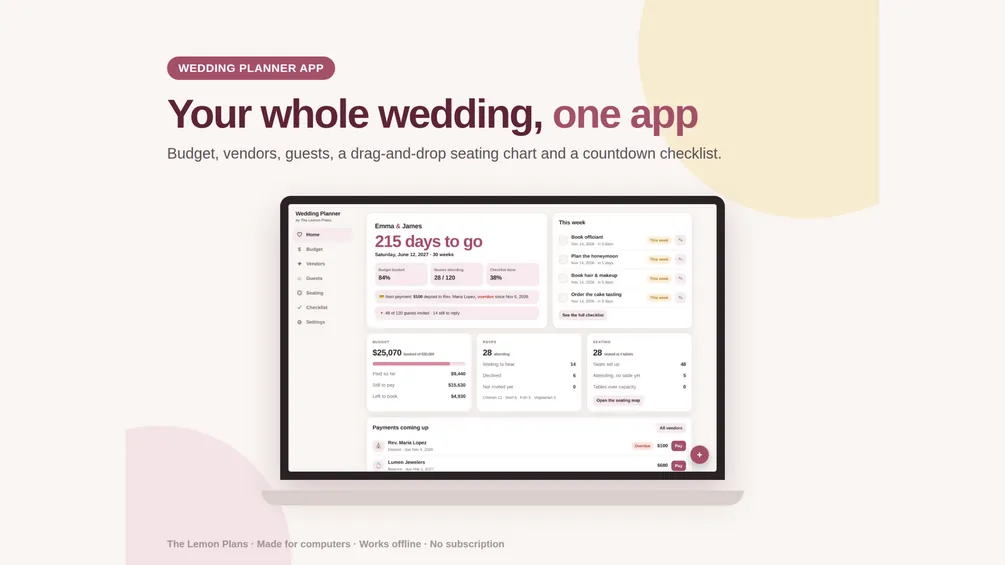
A wedding budget planner for Google Sheets and Excel, and a wedding planner app that works offline. Set your date and budget, and see what's booked, paid and still owed, who's coming and where they sit.
- Budget split by category
- Guest list and RSVPs
- No subscription
Everything we make for your wedding
Both include a sample wedding so you can see how they work, and both are yours to keep.
-
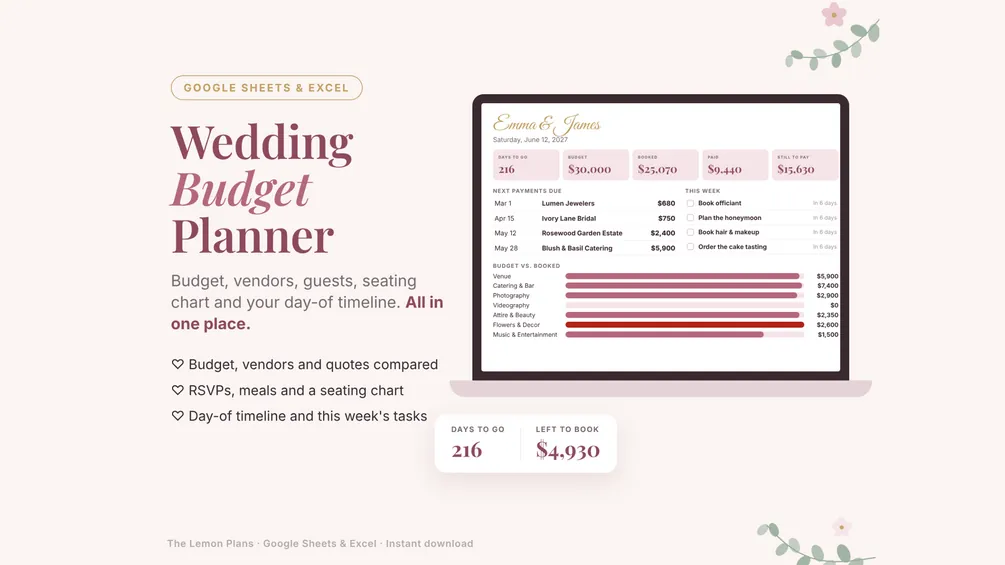
Google Sheets & Excel
Wedding Budget Planner
Budget by category, vendors and quotes side by side, payments, up to 300 guests, a seating chart, checklist and day-of timeline.
$6.99
Was $9.99Launch price: 30% off, applied at checkout -
Offline app
Wedding Planner App
Wedding budget, vendor deposits, guest list with RSVPs, a floor plan seating chart with families, keep-apart warnings and Auto-seat, and a countdown checklist.
$6.99
Was $9.99Launch price: 30% off, applied at checkout
| Feature | Wedding Budget Planner | Wedding Planner App |
|---|---|---|
| Works in | Google Sheets (computer, phone, tablet) and Excel | Your browser on a computer, offline |
| Budget | 15 categories with suggested splits, over-budget alerts | 15 categories with a split you can change, over budget turns red |
| Vendors and payments | Contracts, deposits, balances, late payments highlighted | Deposits and due dates, one-click payments, overdue flags |
| Compare vendor quotes | Yes, side by side | No |
| Guest list and RSVPs | Up to 300 guests, meals, gifts, thank-you notes | Paste a whole list, RSVP and meal counts |
| Seating chart | Type a table number, the table map fills in | Floor plan of your room: drag and turn tables, drag guests or whole families onto seats, Auto-seat with Undo, print or PDF |
| Families and keep apart | No | Seat a family as a group; warns when keep-apart guests share a table |
| Checklist | 37 tasks counted back from your date | 37 tasks with target dates and this week's tasks |
| Day-of timeline | Yes, hour by hour with vendor contacts | No |
| Price | $6.99 (launch price) | $6.99 (launch price) |
Split your wedding budget by category
Type your total and see a starting split for 15 categories. It's the same default the app uses; move the percentages to match what matters most to you.
Read the full wedding budget breakdown, with how to adjust it and keep a buffer.
- Venue20%$6,000
- Catering & bar25%$7,500
- Photography10%$3,000
- Videography4%$1,200
- Attire & beauty8%$2,400
- Flowers & decor8%$2,400
- Music & entertainment6%$1,800
- Cake & desserts2%$600
- Invitations & stationery2%$600
- Rings3%$900
- Officiant & ceremony1%$300
- Transportation2%$600
- Favors & gifts2%$600
- Wedding planner4%$1,200
- Other & buffer3%$900
Wedding planning checklist by month
What to book first, counted back from your date. The planner and the app put all 37 tasks on your own dates.
12+ months before
Set the frame: money, date and size.
- Set your total budget together
- Pick a date and rough guest count
10 to 12 months before
Book the vendors who fill up first.
- Book photographer
- Book caterer
8 to 10 months before
Attire, music and flowers.
- Shop for the dress
- Book DJ or band
6 to 8 months before
The ceremony and the trip after it.
- Book officiant
- Plan the honeymoon
4 to 6 months before
Paper, rings and getting around.
- Order invitations
- Buy wedding bands
2 to 4 months before
Invitations go out.
- Mail invitations
- Dress fittings
Seat everyone on a real floor plan
The Wedding Planner App draws your room to scale. Place the tables, let Auto-seat fill them or drag guests and whole families onto seats, and see at a glance who still needs a table.
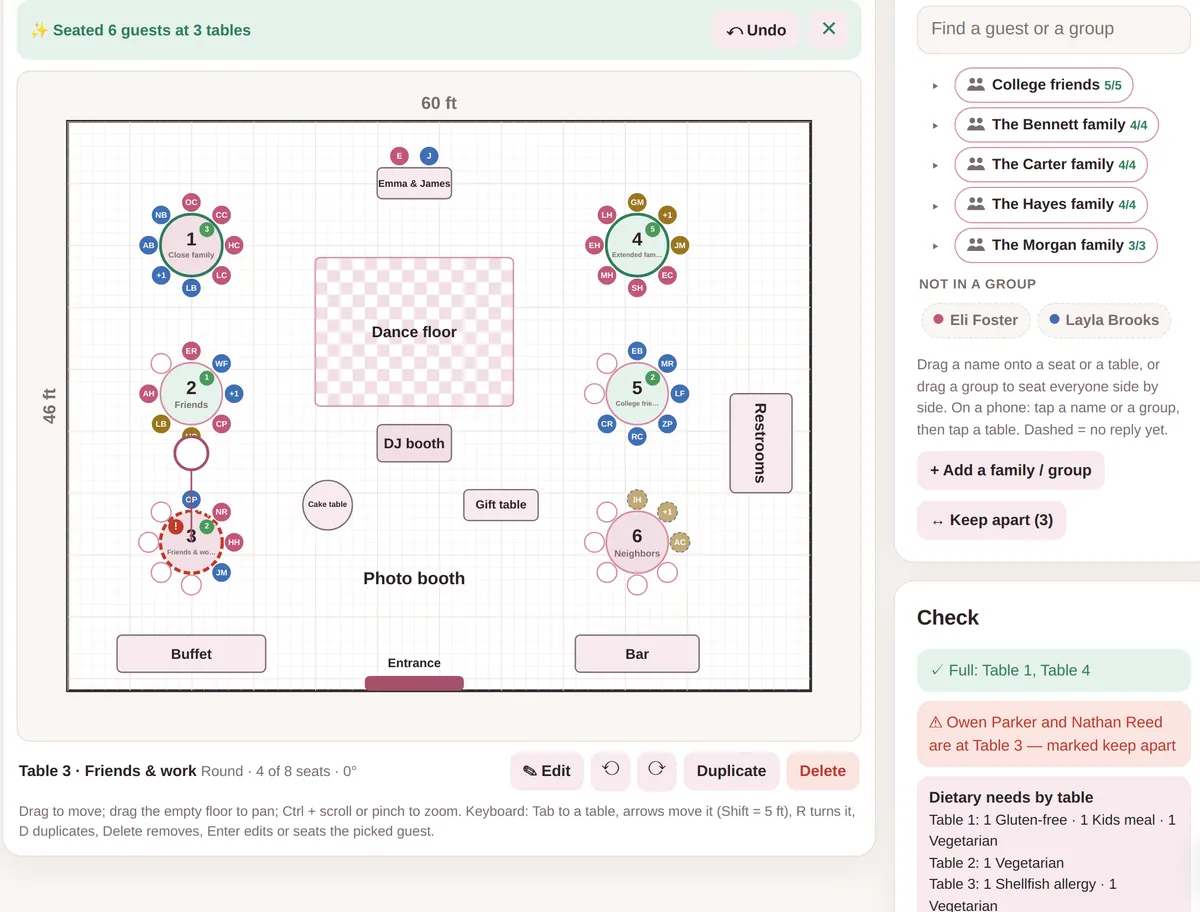
- Round, rectangle, banquet and head tables.Drag them anywhere, turn them, duplicate them, snap to the grid. Add the dance floor, DJ, bar, buffet and doors.
- Families and groups.Add a whole family or a group of friends at once, then drag the group onto a table to seat everyone side by side. Color guests by side, meal or group.
- Auto-seat, with Undo.One click fills the open seats, keeping families together and keep-apart guests at different tables. Undo puts everything back; then fine-tune by hand.
- Keep apart.Mark guests who shouldn't share a table. If they land at the same one, the plan flags it before anything goes to the venue.
- Warnings before the big day.Full and over-capacity tables, attending guests without a seat, and dietary needs counted per table for the caterer.
- Print it or save a PDF.Print the plan for the venue, or export a CSV by table for escort cards.
Try it with the sample wedding
The free demo opens with a sample wedding: families, a keep-apart pair and an Auto-seat button to try. Nothing to install.
Seating chart tips
Start once RSVPs are in, about a month before. These five rules settle most of it.
- Seat by relationship, not by table count.Fill tables with groups who already know each other: college friends, work friends, one side's cousins.
- Place family first.Parents and grandparents close to the head or sweetheart table; separate tables for divorced parents if that keeps the peace.
- Think about access.Older guests and anyone using a wheelchair near exits and restrooms, away from the speakers.
- Keep plus-ones with their partner.And seat kids with their parents unless there's a kids' table with a sitter.
- Send meal counts per table.Your caterer needs each table's meal choices, not just the totals.
Wedding guides
- Wedding budget breakdown by category, with percentagesA simple wedding budget breakdown by percentage, with dollar amounts for $20,000 and $35,000, plus how to adjust it, keep a buffer and track deposits.
- How to make a wedding seating chart, step by stepHow to make a wedding seating chart: when to start, table shapes, family and kids, accessibility, escort cards, and what to send your venue and caterer.
Wedding planner questions
Should I get the spreadsheet or the app?
Pick the spreadsheet if you want to plan on your phone too, share it with your partner in Google Sheets, compare vendor quotes or print a day-of timeline. Pick the app if you'd rather click than type into cells and want to seat guests on a floor plan of your room, with families kept together, keep-apart warnings and Auto-seat. Try the app demo first to see which you like.
Can my partner and I plan together?
Yes. Share your Google Sheets copy with your partner and you both edit the same planner. With the app, download a backup and send it to your partner to restore on their computer.
Does the app work on my phone?
The app is made for computers today; phone support is on the way. The Google Sheets planner works on phones and tablets.
Is there a subscription?
No. You pay once and keep the files. Your guest list and budget stay in your own Google Drive, Excel file or browser.
Can the app seat our guests for us?
Yes. Auto-seat fills the open seats in one click, keeping each family or group together and putting guests marked keep apart at different tables. If you don't like the result, Undo puts everything back, and you can always move people by hand.
How should we split our wedding budget?
A common starting point is about a quarter for catering and bar, a fifth for the venue and a tenth for photography, then smaller shares for everything else. Our budget breakdown guide has the full split with dollar amounts.
Plan it once, keep it all in one place
Budget, vendors, guests and seating, with the math done for you.